 V2K Migrate
While talking to people who run VMware environments, one concern kept coming back. A lot of their workloads are Windows guests, and many of those still use static IP addresses. For them, preserving the network identity is a core migration requirement, not an optional extra. At first it sounded like one more value for an import call. It isn't that simple.
01 / Address ownership
Who actually holds the address?
A persistent Windows IP is guest configuration. It lives inside Windows and is tied to a network adapter. CloudStack keeps a separate platform record for the VM NIC, its network, its MAC address, the default NIC and any fixed IP reservation.
The MAC can matter outside the VM as well. DHCP reservations, software licences, firewall or NAC rules, monitoring and inventory systems may use it to identify the machine.
Fix only the guest and CloudStack doesn't know that the address belongs to the VM. Fix only CloudStack and Windows may still boot with the wrong adapter settings. The two records need to describe the same network identity.
CloudStack's shared-volume importVm call imports the disks and
creates a temporary NIC on a chosen network. It accepts the placement details,
but not the source MAC or static IP. That gets the VM into CloudStack, but the
network identity still has to be reconstructed.
02 / Discovery
How does V2K know which NIC is which?
Before conversion, V2K Migrate reads the Windows SYSTEM hive from the offline guest disk and opens it read-only. It then classifies each adapter as static, DHCP or unknown, together with the values needed for a safe match.
Matching starts with a unique MAC address. If that isn't enough, V2K can use an unambiguous IP overlap or a safe single-NIC fallback. An uncertain match stays uncertain. The tool doesn't attach an address to whichever adapter looks closest.
The destination network still has the final say about gateway and prefix. A source static IP is prepared automatically only when its address and prefix are compatible with that network. Source DNS settings are kept for the guest.
03 / Reconstruction
The stopped-VM reconstruction sequence.
For a safely matched static NIC, V2K passes the preserved MAC and IP settings
into the Windows conversion work. A guarded one-shot first-boot script finds
the adapter by that MAC and applies the settings. Modern Windows uses
Get-NetAdapter; older versions have a WMIC fallback. The network
commands use netsh.
On the CloudStack side, the destination VM remains stopped while its NICs are rebuilt. The temporary import NIC is useful as a pivot, but it must not remain in the final VM.
- 01
Call
addNicToVirtualMachinefor the desired default network, source MAC and safe static IP. - 02
Call
updateDefaultNicForVirtualMachineso the reconstructed NIC becomes the default. - 03
Remove the generated temporary NIC, then add the remaining source NICs in their mapped networks.
- 04
Read the stopped VM back and verify the NIC count, networks, MACs, IPs, default NIC and absence of the placeholder.
If any API call or final read-back check fails, V2K does not mark the import as successful. The VM remains stopped, including when CloudStack contains a partly reconstructed NIC set, so the result can be inspected or retried without letting Windows boot into an unknown network state.
04 / Mixed NIC example
One static NIC and one DHCP NIC.
Take a Windows VM with two source adapters. NIC 0 uses MAC A and the static
address 10.1.1.27/24. It is also the default NIC. NIC 1 uses MAC B
and DHCP.
CloudStack first imports the VM with a temporary NIC. V2K then adds NIC 0 with
MAC A and the fixed address 10.1.1.27, makes it the default and
removes the placeholder. NIC 1 is added with MAC B but without a fixed IP.
The final stopped VM has exactly two VirtIO NICs. The static NIC keeps MAC A
and CloudStack reserves 10.1.1.27 for it. The DHCP NIC keeps MAC B,
but its next lease may be different. DHCP isn't described as static-IP
preservation.
The Windows static IP is persistent guest configuration. The CloudStack IP is a platform reservation. It isn't a DHCP assignment.
05 / Failure and limits
Where does automation stop?
A single-NIC static VM needs an explicit staging network for the import pivot. Without one, preflight blocks the operation. Two source NICs also cannot map to the same CloudStack network, because reconstruction would be ambiguous.
If the source prefix doesn't fit the destination network, policy decides what happens. Block stops the migration. Warn and record only can continue without changing the guest's static settings, and the destination VM remains stopped for review. V2K never fixes this by silently switching the guest to DHCP or by pinning an address to the wrong network.
A pure DHCP guest currently receives a new destination MAC. If the DHCP server uses MAC-based reservations, the old reservation will no longer match and the guest may receive a different address. Review the new MAC and update that reservation before first boot. In a mixed static and DHCP VM, the reconstruction flow preserves the source MACs for the complete NIC set.
Turning Preserve Static IPs off disables this complete path: no static classification, no static first-boot preparation and no source-MAC reconstruction. This implementation currently covers static IPv4 only. IPv6 preservation is not implemented.
06 / What we tested
The control-plane path and a real Windows migration.
This network preservation path is implemented on the product's main branch. Focused automated tests cover the documented control-plane workflow, including stopped-VM NIC reconstruction and read-back checks.
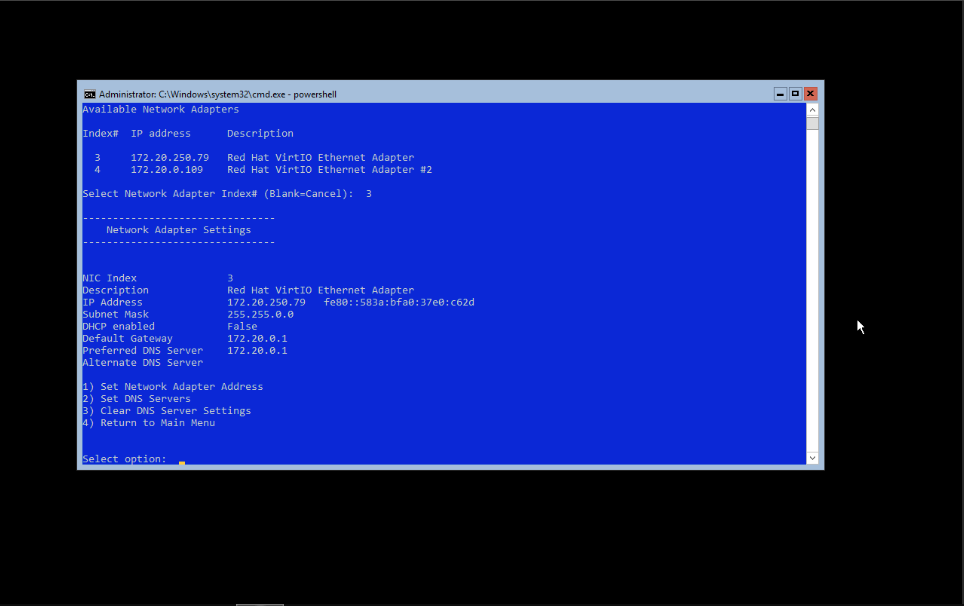
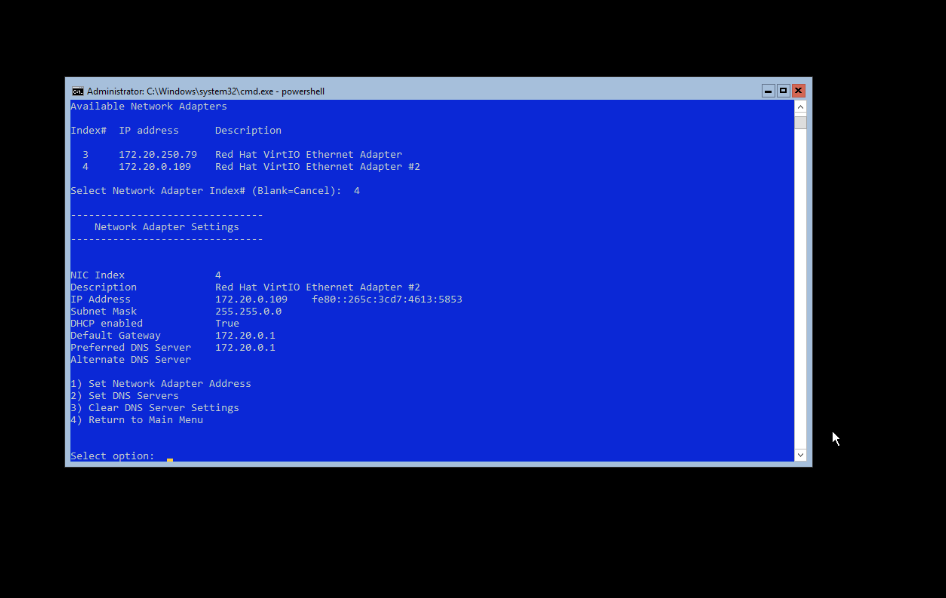
We also ran a warm NFS-to-NFS CloudStack migration in the physical lab with Windows Server 2019 Core, two disks and two NICs. It retained the static and DHCP network identity, imported with VirtIO devices and booted on KVM.
The same requirement also appears on Proxmox. In another lab run, a migrated Windows guest booted with VirtIO networking: the first NIC kept its static IPv4 configuration and the second stayed on DHCP.
An accepted importVm call doesn't prove that Windows has booted,
that QEMU Guest Agent is available, that VMware Tools were removed, or that
the application is healthy. Those checks remain separate after first boot.
The control plane does not pretend that a successful import is the same as a
healthy workload.