 V2K Migrate
The problem appeared when we stopped thinking about one migration and used 20,000 as a deliberately uncomfortable planning number. It wasn't a customer count. If the V2K server or its PostgreSQL disk is lost, a fresh installation can discover the source VMs again from an intact vCenter, but it can't know which ones already completed a migration.
01 / The failure case
What if the new database is empty?
The normal answer is to restore the old database. That is still the best answer. PostgreSQL contains the complete history, and a proper restore brings back much more than any small marker can hold.
But backups can be missing, damaged or restored from the wrong point in time. The old control-plane server may simply be gone. If the source vCenter is still intact, its VM object can be the one thing that both the old and new V2K installations can identify.
A status shown only in the old UI does not help. Neither does a row that vanished with the old database. We needed one small piece of completion evidence outside the V2K control plane.
02 / Plans and outcomes
Why keep outcomes separate from plans?
Migration plans are operational work queues. Operators create them, run them and later delete them, so keeping every completed plan forever would turn normal housekeeping into an audit policy.
V2K now writes every successful workflow to a separate
migration_outcomes table. Those rows sit outside the plan cascade, so
deleting a plan does not delete the result. A storage-only delivery becomes a
completed outcome when the final worker work is settled. A consumer-managed flow
can first be data_ready, then becomes completed in the same database
transaction that records the successful destination import and target ID.
PostgreSQL remains the full source of truth. It keeps every successful migration of the same source VM in order, including later moves to a different destination.
03 / The source record
One small JSON value in vCenter.
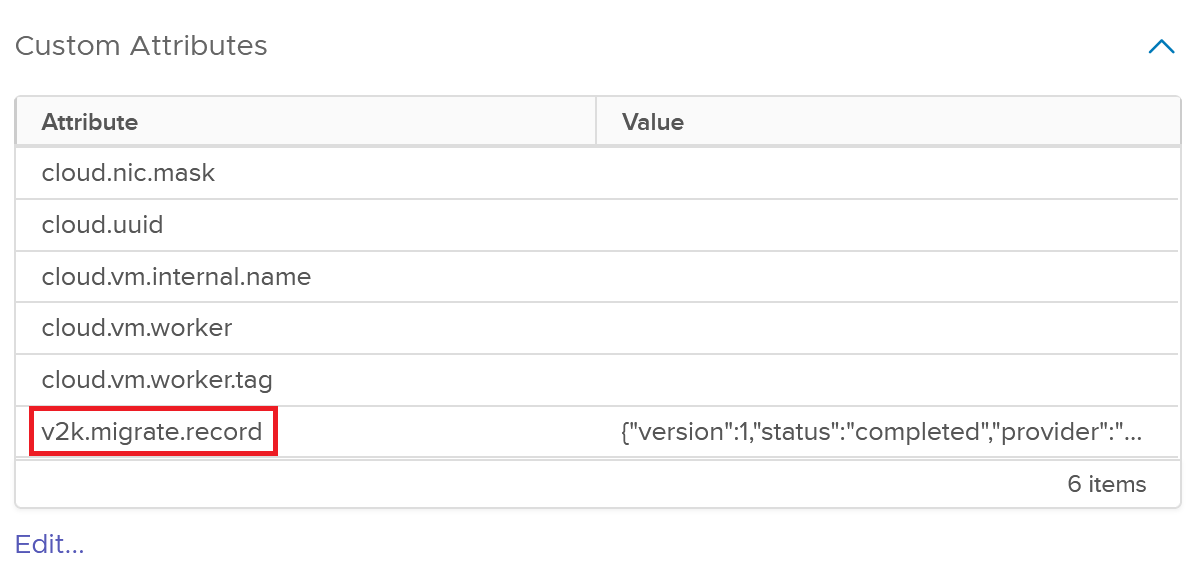
The newest successful outcome is also stored in a vCenter custom attribute named
v2k.migrate.record, attached to the source VM object. The value lives
in vCenter data, not in the VM's .vmx file. It can survive loss of
the V2K database, but it can't help if vCenter also lost its custom attribute
data. This is the shape of a real lab value:
{
  "version": 1,
  "status": "completed",
  "provider": "cloudstack",
  "completed_at": "2026-08-18T11:43:07.536478Z",
  "outcome": "79c3f92d-64c9-4372-9afe-8cb188eae78a",
  "target": "c2ec483a-7171-42c8-905f-7ebab204e70e"
}
outcome is the durable V2K outcome identity used for correlation.
target is an opaque provider object ID, such as a destination VM ID.
It is not a URL, credential or configuration block. For a storage-only handoff,
filesystem paths and descriptor names are deliberately kept out of the marker;
they stay in PostgreSQL and the artifact manifest.
The marker never contains credentials, endpoint URLs, plan configuration, storage paths or the complete execution history. Anyone who can read that VM's custom attributes can see it, so there are no secrets inside. The parsed value is limited to 2,048 bytes.
04 / Writing the marker
It is written only after completion.
Browsing inventory doesn't create the custom-field definition. V2K looks it up
and creates it only when the first completed outcome needs to be written. The
vCenter sequence is small: find or add the field for VirtualMachine,
call Set on the source VM, then read customValue back.
The marker becomes confirmed only when the returned string exactly matches the
value V2K wrote. The service account needs SetCustomField. It also
needs ManageCustomFields if V2K must create the definition; an admin
can create the field in advance and avoid that second privilege.
The reconciler runs every 30 seconds by default. A cycle has a two-minute limit, and an individual write has 30 seconds. A vCenter failure doesn't rewrite the migration result. The migration stays completed, the UI shows marker pending or error, and the writer retries later.
05 / Fresh-install recovery
How does a new control plane find the old result?
This is the recovery path we wanted from the start. It isn't a substitute for a normal restore, but it gives a fresh installation something honest to work with.
- 01
The customer installs a fresh V2K control plane and registers the same source vCenter with valid read access.
- 02
A normal manual or scheduled inventory sync reads VM
customValuedata in the existing bulk property request. There is no extra API call for every VM. - 03
The raw
v2k.migrate.recordvalue is stored as inventory evidence and markedobserved. - 04
The reconciler applies the strict Version 1 parser. Unknown fields, trailing data, bad UUIDs, unsupported status or version, missing values and over-sized fields are rejected.
- 05
If the empty database has no matching local outcome, V2K creates exactly one minimal completed outcome with marker state
external. - 06
The recovered row uses the marker provider, target and completion time plus the source VM identity from current inventory. Plan, plan-VM and attempt IDs remain null.
- 07
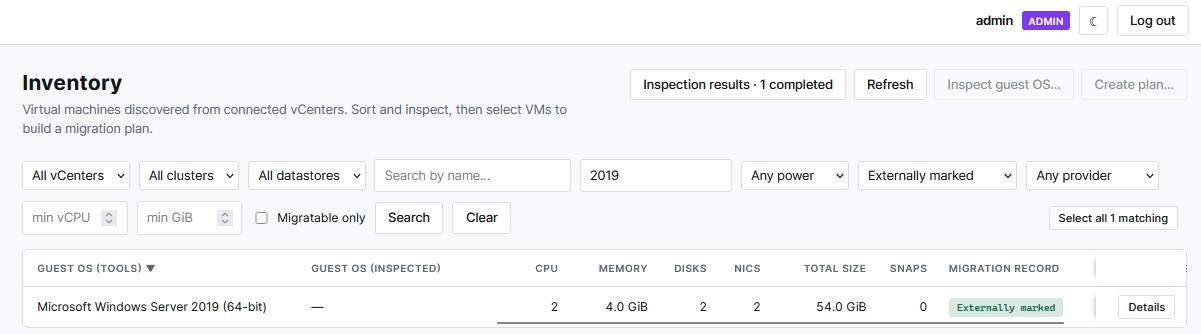
The Inventory page marks the VM as Externally marked. Operators can filter for these records and review them.
- 08
Recovery discovery stays read-only. An external outcome is not queued for a marker write back to vCenter.
This source VM carried a valid V2K completion record. It doesn't prove that the destination still exists, and it doesn't recreate an old plan, agent, pass history or verification report.
06 / Conflicts and retries
What happens when the records disagree?
A valid marker that exactly matches the latest local outcome becomes confirmed. A malformed marker becomes invalid and stays visible to the operator. If a valid marker disagrees with confirmed local history, V2K marks a conflict instead of overwriting either side.
The same rule covers a globally duplicated outcome UUID attached to another VM. V2K won't adopt it. If a previously confirmed marker is removed while the completed local outcome still exists, that outcome returns to pending and the writer recreates and verifies the field. It must not suddenly look like the VM was never migrated.
There is one intentional replacement case. If PostgreSQL already has a newer successful outcome waiting for its marker, the writer can replace the older source value with that latest success.
The marker isn't signed. Anyone with SetCustomField on that vCenter
can write a syntactically valid value, and anyone with read access to the VM's
custom attributes can see it. That is why it contains no secrets, why the
parser is strict and why a recovered outcome is labelled
Externally marked instead of being silently merged into local
history.
07 / Re-migration
The same VM can migrate again.
A source VM may be migrated again. It might move to CloudStack first and Proxmox later, or the same migration may be repeated for a new environment. A new plan creates a new durable outcome. The old one remains part of PostgreSQL history.
The vCenter field stores only the latest successful result because it is a small recovery record, not a ledger. The UI can show both an active attempt and an older success. A later failure does not erase the last successful outcome.
08 / Lab evidence
We tested the database-loss path, not only the write.
Migration 0043 preserved nine historical successes. Only one of those source VMs still existed in vCenter, and that VM passed the physical custom-field write and exact read-back check.
We then created a disposable control plane with a fresh database. It received only the encrypted vCenter registration: no users, plans, plan VMs, agents, inventory or outcome rows. Its first read-only inventory sync discovered 21 current VMs and found the marker on the remaining Windows Server 2008 fixture.
The new database created exactly one completed CloudStack outcome with marker
state external and null plan IDs. The marker SHA-256 matched between
the old and new databases. The recovery instance made no marker write, and the
run produced no marker error.
The other eight source test VMs no longer existed in vCenter. Their complete history survived only in PostgreSQL. That result is just as important as the successful recovery case.
09 / Limits
What this record cannot recover.
The source marker cannot recover:
- source VMs that were deleted from vCenter;
- a rebuilt or restored vCenter that lost its custom attribute data;
- the full history of repeated migrations;
- old plans, passes, agents, errors or audit events;
- credentials, destination configuration or endpoint URLs;
- artifact manifests or storage-only paths; or
- proof that the destination VM still exists or the workload is healthy.
The real disaster-recovery set remains PostgreSQL, the matching master key, deployment configuration and the artifact volume. The marker keeps one useful fact alive: this source VM carried a valid V2K completion record. Nothing more.